Posts

Umbraco Razor - List Documents form Folder selected via the Media Picker

1) Create a Media Picker in your Document Type: "listFilesFromAParticularFolder"  2) Create this Macro @using Examine @using Examine.SearchCriteria @using UmbracoExamine @using System.Xml.XPath @{                  if (@Model.listFilesFromAParticularFolder != "" && @Model.listFilesFromAParticularFolder != null)  {                    dynamic imageFolder = Library.NodeById(@Model.listFilesFromAParticularFolder);                                       <h2>Related Documents</h2>                       ...
Umbraco Razor getNodes of a certain type

var getNodes = Model.AncestorOrSelf().Descendants("ShopItem"); // Programmes Nodes int numberOfNodes = getNodes.Count(); @numberOfNodes

Umbraco: Load Different Stylesheets depending on values in a Tick Box.

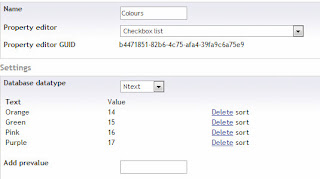
Image
The purpose of this is to allow the user to influence the colours of a page by loading a different style-sheet. Using CSS, Umbraco and Razor. STEP 1: Create a New Data Type 1)  Add a new Data Type called "Colours" 2) Make the Data Type a Checkbox List and add some Values to it for the User. Example: STEP 2: Add the Colours Option to the Document Type in the Backend STEP 3: Add Seperate CSS Style Sheets with your CSS Rules For example:  colour-purple.css, colour-gree.css, color-orange.css, colour-pink.css  STEP 4: Create Some Razor Code ... @if (@Model.pageColour == "Purple") { @Html.Raw("<link href=\"/css/colour-purple.css\" rel=\"stylesheet\" type=\"text/css\" media=\"all\" />"); } @if (@Model.pageColour == "Pink") { @Html.Raw("<link href=\"/css/colour-pink.css\" rel=\"stylesheet\" type=\"text/css\" media=\"all\...

Umbraco Razor Get by template Id

@Html.Raw("Hello: " + @Model.NodeById(listingPage).Children.Where("template=1201").Count());

Umbraco Razor test to see if on current page

if(@node.Url == @Model.Url) { <li> <a href="@node.Url"><span style="text-decoration:underline">@node.Name</span></a>                                       </li> } else { <li> <a href="@node.Url">@node.Name</a>                                       </li> }

Umbraco Razor Add Line Breaks to Textbox multiple

@if (@Model.address != "") { var output = (umbraco.library.ReplaceLineBreaks(@Model.address)); <p>@Html.Raw(@output)</p> }

Umbraco 4 Backend not showing CSS, Javascript or Sections after moving to Local Host

Image
The issue below can be resolved by: 1) Rename the Folders: App_Browser and App_Data to something like, App_Browser_old and App_Data_old 2) Log in to your Umbraco Backend If you receive errors like:  "Values cannot be returned until Resolution is frozen" , Press the refresh button. If you then get the message: The website is restarting Please wait for 10s while we prepare to serve the page you have requested... Go for a cup of tea and come back. Umbraco 4 Backend Still not working?  In IIS --> Application Pools --> Change the Managed Pipeline to Classic instead of Integrated for the site

Umbraco Razor - List Subpages from Specific Node - byNodeId - Liist Lates News - Get Node By Id

@inherits umbraco.MacroEngines.DynamicNodeContext @using umbraco.NodeFactory @* Ensure that the Current Page has children, where the property umbracoNaviHide is not True *@ @if (Model.NodeById(1850).Children.Any()) { <div class="sideBarWidget"> <h2><a style="color:#ffffff" href="@Model.NodeById(1850).Url" title="News">Scottish Medical Training<br />Latest News</a></h2>     <ul>                   @* For each child page under the root node, where the property umbracoNaviHide is not True *@          @foreach (var childPage in Model.NodeById(1850).Children.OrderBy("newsArticleDate descending").Take(4))        {             <li>                <a href="@childPage.Url">@childPage.newsArticleTitle</a>  -  @childPage.newsArticleD...

c# Umbraco Razor Display List of all Session Varioables

@inherits umbraco.MacroEngines.DynamicNodeContext <p>Session Variables</p> @HttpContext.Current.Items.Count:<br /> @for (int i =1; i <= @HttpContext.Current.Session.Contents.Count; i++) {    @HttpContext.Current.Session.Keys[i-1]; <br /> }

Umbraco Razor Media Picker - how to display a link from the media picker

    var node = Library.NodeById(Model.videoFollowUpLink);     <a href="@node.Url">@node.Name</a>