Posts

Showing posts with the label Umbraco

Umbraco 7 Year Now Razor Snippet

How to display the current year in Razor and in Umbraco 7  @DateTime.Now.Year For example: <p>Copyright &copy; @DateTime.Now.Year </p> I use this on a lot of my umbraco websites for keeping the copyright up to date.  You can see an example of this on the footer of my most recent Umbraco website design at: http://www.markdevelopment.co.uk/portfolio/abercromby-heating-and-plumbing-services/

Umbraco 7 HTML Site Map Partial View

@inherits Umbraco.Web.Mvc.UmbracoTemplatePage @{ var home = CurrentPage.Site(); } @if (home.Children.Any()) {     @* Get the first page in the children *@     var naviLevel = home.Children.First().Level;     var listChildPages = "false";     @* Add in level for a CSS hook *@     <ul style="margin-top:0px;paddin:0px;font-size:16px;">                 @* For each child page under the home node *@         <li><a href="/" title="@CurrentPage._siteTitle">Home</a></li>         @foreach (var childPage in home.Children.Where("Visible"))         {             if (childPage.Children.Any() && listChildPages =="true"  && childPage.id != 111...

Umbraco 7 Metadata, Keywords, Description and Title

@{            var SEOTitle = "";         var SEODescription = "";         var SEOKeywords = "";      }      @if(CurrentPage.seoTitle != null && CurrentPage.seoTitle != "")      {         SEOTitle = CurrentPage.seoTitle;      }      else      {         SEOTitle = @CurrentPage.Url.Replace("/"," | ") + @CurrentPage._siteTitle;         SEOTitle = SEOTitle.Substring(2, SEOTitle.Length-2);      }          @if(CurrentPage.seoDescription != null && CurrentPage.seoDesctiption != "")      {         SEODescription = CurrentPage.seoDescription;  ...

Umbraco 7 Hide a page from Navigation or Sub Navigation with umbracoNaviHide using Razor in a template or partial view

Image
How to Allow the user to Hide a Page from Navigation in Umbraco 7. By using a tick box: This example shows hide the Search Results page from the main navigation in umbraco 7. 1)  In your Document Type add a property called "umbracoNaviHide", it must be called "umbracoNaviHide" The property should be a tick box, so it should be a "True/False " 2) In your Navigation, add the highlighted code to your for each loop that writes out the navigation:   @foreach(var p in homePage.Children() .Where("visible") )                         {                             write out navigation 3) Now when the user ticks Hide from Nav in the backend, the page will not show in the navigation:

Umbraco 7 Partial View List Sub Pages from a Particular Node

@inherits Umbraco.Web.Mvc.UmbracoTemplatePage @{   var startNode = Umbraco.Content(1105); try { foreach (var page in startNode.Children.Where("Visible")) { <li><a href="#">@page.Name</a></li> } } catch{} }

Umbraco JQuery Search with drop down selection, Usinc C# Razor

Umbraco C# Razor - Parsing XML example using uComponents URL picker to a list of Documents from the Media section

Image
The code below shows you how to get a chosen list of documents using the uComponents Multi-Url picker The Code that is comment out highlights the steps to get to the end result. The Code shows how to parse raw XML in Razor. Here is what the code does: Step 1) "Get the Document List:" var urlPicker = Model.GetPropertyValue<UrlPickerState>("pickDocuments"); "pickDocuments" is the field in my Document Type it is a uComponents Multi Midia Picker Step 2) Get Type and display full string: This code is comment out - if you uncoment it, it will show you the raw XML that needs to be parsed, for example: @urlPicker  displays the xml: <multi-url-picker><url-picker mode="Media"><new-window>False</new-window><node-id>1721</node-id><url>/media/53699/learning-log-v4-macroless-.xls</url><link-title /></url-picker><url-picker mode="Media"><new-window>Fal...

Umbraco Razor C# to List Documents from a Particular Folder, List the File Sizes to 2 Decimail Pace, and Date of the Umbraco Files

Image
The Script Below: 1) Lists the Files in  a folder Chosen from the Media Pickers 2) Converts / Parses the umbracoBytes to KBS and MB 3) Rounds the Umbraco File Size to 2 Decimal Paces 4) Formats the Razor Umbraco Date for Output 5) Writes out the Size of the Files in KBs 6) Writes out the formated Fate 3) Writes out a description of the document.   foreach (var folder in imageFolder.Children)   {   try{ double KBsize = 0; double MBsize = 0; double FileSize = Int32.Parse(@folder.umbracoBytes); KBsize = FileSize / 1024; MBsize = FileSize / 1048576; // Round KB Size to 2 Decimal Points KBsize = Math.Round(KBsize, 2); // Format Date string outDate = @library.FormatDateTime(@folder.createDate, "dd/MM/yyyy");   <p>&bull; <a href="@folder.Url">@folder.Name (@folder.umbracoExtension) | File Size:  @KBsize KB | Date Created:  @outDate</a...

Umbraco: Load Different Stylesheets depending on values in a Tick Box.

Image
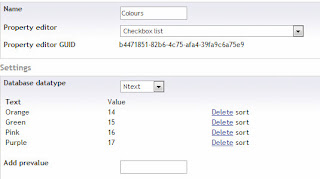
The purpose of this is to allow the user to influence the colours of a page by loading a different style-sheet. Using CSS, Umbraco and Razor. STEP 1: Create a New Data Type 1)  Add a new Data Type called "Colours" 2) Make the Data Type a Checkbox List and add some Values to it for the User. Example: STEP 2: Add the Colours Option to the Document Type in the Backend STEP 3: Add Seperate CSS Style Sheets with your CSS Rules For example:  colour-purple.css, colour-gree.css, color-orange.css, colour-pink.css  STEP 4: Create Some Razor Code ... @if (@Model.pageColour == "Purple") { @Html.Raw("<link href=\"/css/colour-purple.css\" rel=\"stylesheet\" type=\"text/css\" media=\"all\" />"); } @if (@Model.pageColour == "Pink") { @Html.Raw("<link href=\"/css/colour-pink.css\" rel=\"stylesheet\" type=\"text/css\" media=\"all\...

Umbraco .NET C# Usercontrol Permenant Redirect to Parent Node

This is the Code behind file to permanantly redirect to a parent node in Umbraco. There is no need to have any controls on the .asxp page. Step 1: Create a .Net User Control called: " RedirectToPARENTnode.aspx " Step 2: Paste the code in to the code behind file (.cs): ( important bits highlighted in yellow ) using System; using System.Collections.Generic; using System.Linq; using System.Web; using System.Web.UI; using System.Web.UI.WebControls; using umbraco; using umbraco.presentation.nodeFactory; namespace MyUserControls.Usercontrols {     public partial class RedirectToPARENTnode : System.Web.UI.UserControl     {         protected void Page_Load(object sender, EventArgs e)         {               //MD 06/08/2012                  ...